
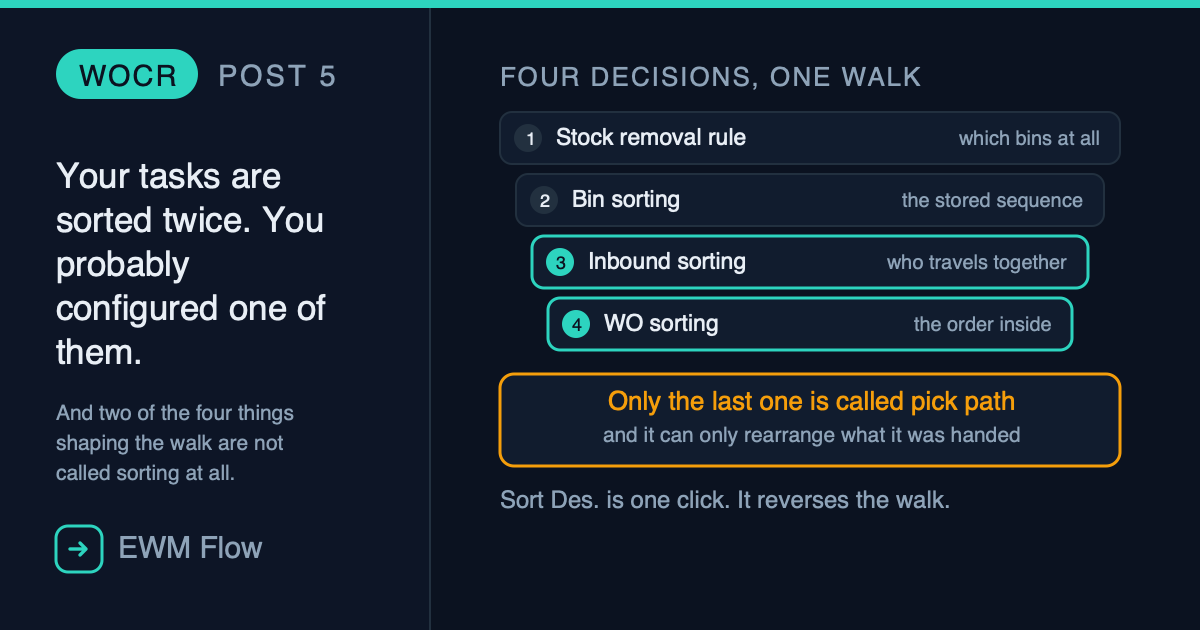
The picker walks to the far end of the aisle, picks one line, walks back past six bins he will return to in twenty minutes, and carries on.
You check the configuration. The bin sort is correct. The sort rule is correct. The activity area is correct. Everything a checklist would ask about is correct — and the walk is still wrong.
It is wrong because the order those tasks come out in was decided four separate times, in four different objects, and only two of them live inside the creation rule you them. Configure one and the other three quietly overrule you.
This post takes all four apart, in the order they actually run.
The one that surprises people
A warehouse order creation rule does not carry a sort setting. It carries two — and they do completely different jobs. One decides which tasks end up travelling together. The other decides the order they are visited in once they do. Most teams configure the second one and assume it did the first one’s work.
Four Decisions, One Walk
Before any screens, the sequence. Each of these runs before the next, and each one constrains what the next can do.

Read it as a funnel. By the time anything called a sort rule runs, the bins have already been chosen — and by the time the operator sees a list, the decision about who travels with whom has already been taken.
Decision 1 — The Removal Rule Already Picked the Bins
This one is not a sorting setting at all, which is exactly why it gets left out of pick path conversations. But it is first, and it is decisive.
The stock removal rule sorts the available stock and takes the top of that list. Every attribute describing the quant is available to it, sorting by more than one field is possible, and the rules are applied by storage type or storage type group. Goods receipt date ascending then quantity descending is a common one, and it is a FIFO policy — not a walking policy.
Goods Issue Process → Strategies → Specify Stock Removal Rule
Why this belongs in a post about walking
A removal rule optimised purely for stock rotation will happily send a picker to the oldest pallet in the building for one line, and then to the other end for the next. Nothing downstream can repair that: sorting can only reorder the bins you were given, never choose different ones. If your walk is bad and the sorting looks right, this is where to go — and it is partly a policy conversation, because the trade is rotation against travel. Only partly, though: the rule can also be made aware of what is already happening on the floor. Include PICK_ITM or PICK_QT among the sort fields and, where several fixed bins hold the same product, the system will steer the next task towards a bin that does not already have an open task on it — so two people are not sent to the same shelf.
Decision 2 — The Stored Sequence the Warehouse Was Sorted Into
Bins do not have an inherent order. The order they are accessed in is created by sorting them inside an activity area, per activity, and the result is stored.
The bin sort is controlled by the sort sequence assigned to the activity area and the activity, and bins are described by their structural attributes — aisle, stack, level, bin subdivision, depth. A sort sequence might be stack, then level, then bin subdivision.
Master Data → Activity Areas → Define Sort Sequence for Activity Areas/SCWM/SBST — Sort Storage Bins
The half-life of a bin sort
This is the one that rots. The sort must be performed again any time storage bin master data or the related activity areas are added to, changed, or deleted. It is not recalculated as stock moves — that belief is common and wrong. A warehouse that has added bins since go-live and never re-run this has a walking sequence that is correct for a warehouse that no longer exists.
Before you generate anything, run the simulation and look at the resulting sequence per activity. Reading it once tells you more about your own warehouse than any amount of theory about pick paths.
Decision 3 — Inbound Sorting: Who Travels Together
Here is the setting almost nobody talks about, and the reason a technically correct rule produces work packages that make no sense.
A creation rule carries an Inbound Sorting entry, chosen from the sort rules you have defined. EWM applies it at the beginning of warehouse order creation — before the tasks have been bundled into orders — though by then they are already split by activity area, which is what decides the rule that will do the bundling.
That timing is the whole point. Warehouse order creation walks the sorted list of tasks and fills an order until a limit is reached, then starts the next one. So the sort applied before the bundling decides which tasks land in the same order. Change it and you have not reordered the work — you have redrawn the boundaries between work packages.
Cross-Process Settings → Warehouse Order → Define Creation Rule for Warehouse Orders
Sorting and limits are one decision, not two
Inbound sorting only matters because a limit exists. Sort by bin location and cap at ten tasks, and each order is ten neighbouring bins — a tight walk. Sort by product and cap at ten, and each order is ten lines of the same product scattered across the warehouse — a terrible walk that is, by the configuration’s own logic, entirely correct. The limit draws the line; the inbound sort decides what the line cuts through.
Decision 4 — WO Sorting: The Order Inside the Order
The second sort entry on the same rule is WO Sorting, and it applies to sorting within a warehouse order — the sequence the tasks are presented in once the package has been formed.
This is the one people mean when they say «the pick path setting». It is real, and it is last, and it can only reorder what the previous three decisions handed it.
Both entries draw from the same pool:
Cross-Process Settings → Warehouse Order → Define Sort Rules for Warehouse Tasks
What a sort profile actually contains
A profile can specify up to fifteen fields. For each one:
The checkbox that walks the aisle backwards
Sort Des. is one click and it is invisible from every screen except the profile itself. A perfectly generated bin sort, read in descending order by a sort field, produces a walk that starts at the far end. The bin sort is not wrong. The sort rule is not wrong. The combination is. This is the single most common cause of «the sequence is exactly backwards», and it takes ten seconds to check.
And the Setting That Names the Intention
One field on the creation rule declares what kind of package you are trying to build at all: the creation category. The options include consolidation group, pick path, pick-pack-pass, and load and unload.
It is worth reading your rules for this field alone. A rule whose category is consolidation group is optimising for what ends up packed together; one whose category is pick path is optimising for travel. Those two goals pull in opposite directions, and a rule that names one while being sorted for the other will do neither well.
Post 2 took the five profiles apart one at a time; that is the reference if you need the rest of the object. This post is only about the ones that touch the walk.
The Fifth Thing, Which Only Works If You Sorted First
There is one more field on the limit profile, and it belongs in this post rather than in a post about limits, because on its own it does nothing useful — it only works if a sort ran before it.
Field to Limit Warehouse Order Size lets you name a field of the warehouse task, and the system uses it to decide where an order ends. But not the way people assume:
It cuts on change, it does not add up
Once the value of the specified field changes while the system is processing warehouse tasks, no more tasks are added to the order and a new one is created. It is not an accumulator. It never sums anything towards a ceiling. Point it at a quantity field expecting «stop at fifty» and you will get a new warehouse order every time the quantity differs from the previous task — which, on a mixed delivery, is almost every task.
The documented example is the honest use of it: limit by source storage bin (VLPLA), and as soon as the source bin of the processed tasks changes, a new order starts. One order per bin, expressed in one field.
And now the reason it lives in this post. The help for that field carries a recommendation, and it is not decoration:
Specify an inbound sort rule for the creation rule
A cut-on-change field is only as good as the order the tasks arrive in. Sorted by source bin, «the bin changed» happens once per bin and you get clean orders. Unsorted, the same bin can appear, disappear and come back three tasks later — and every reappearance starts another warehouse order. The field does exactly what it promises both times. The difference is entirely Decision 3.
If the field you want to cut on is not a standard one, it can be a custom field on the warehouse task, filled through /SCWM/EX_CORE_CR_INT_CR or /SCWM/EX_WHO_DSTGRP. Worth knowing the door exists; worth walking through it only after the standard fields have genuinely failed.
The Four, Side by Side
Four objects. Two of them live on the same rule and are one field apart on the same screen. Two of them are nowhere near warehouse order Customizing at all.
Diagnosing a Bad Walk, in Order
The complaint is always «the pick path is wrong». Work through it like this and it resolves before step four.
1. Look at the bins, not the sequence. Were these the right bins to visit? If the removal rule is sending you across the building for rotation reasons, nothing else matters.
2. When was the bin sort last performed? If bins or activity areas have changed since, stop here and re-run it.
3. Is the sequence merely reversed? Check Sort Des. on the fields of whichever profile applies. A reversed walk is almost never a complex problem.
4. Are the wrong tasks grouped together? That is inbound sorting and the limit value, not WO sorting. Different symptom, different field.
5. Only now, look at WO sorting — the one everybody opens first.
The pattern is the same one this series keeps running into: the setting named after the symptom is rarely the setting causing it.
A Worked Example, From Delivery to Pallets
Everything above is mechanism. Here is one delivery going through all of it, with the numbers visible at every step, because the interesting part is not any single decision — it is what they do to each other.
The requirement. Every warehouse order must be exactly one pallet, and a pallet holds fifty pieces. Products may be mixed on it.
The delivery. Three items: 100, 60 and 80 pieces. The stock behind them sits in fifteen bins spread across four activity areas, with different goods receipt dates. Removal is FIFO by date; where two bins share a date, the bin sorting sequence decides.
First, the requirement has no field
The obvious move is to set a maximum of fifty on the limit profile. It does not do what it looks like it does — that field restricts the number of tasks in the order, not the number of pieces. Fifty there means fifty warehouse tasks, which on this delivery could be anything from a few hundred pieces to a few thousand.
There is no piece-count ceiling on the profile. So you translate the requirement into an attribute that is on it and that behaves uniformly for these products. Here every piece is 0.1 m³, so:
Maximum Volume = 50 pieces × 0.1 m³ = 5.0 m³Set Maximum Volume to 5, leave the item maximum at zero, and add Max. No. of HUs = 1 so one order can only ever become one physical pallet. The cut happens when the accumulated value exceeds the ceiling, so piece fifty lands at exactly 5.0 m³ and is included; piece fifty-one would reach 5.1 and starts a new order.
Why not weight
Weight is on the profile too, and it accumulates the same way. It is the wrong choice here because it is not uniform: these three items weigh different amounts per piece, so a weight ceiling would cut at a different piece count on every pallet. The attribute you pick has to be the one that is genuinely constant across whatever you allow to mix.
Decision 1 runs, and it scatters the work
FIFO now walks each item down the dates. Nothing about warehouse orders exists yet.
Read where those bins live and the whole outcome is already decided. FIFO was not asked to respect activity areas and it did not: it crossed all four of them, because the oldest stock happened to be spread out.
The areas cut the work up before any ceiling is consulted
The creation rule that applies is obtained from the activity area, and the limit lives inside that rule. So the limit can only ever act on the tasks of one area at a time — the split has already happened.
Look at the last two rows before reading on. AA4 holds twenty pieces and AA2 holds thirty. Nobody designed those. They are what is left when FIFO reaches into an area for one small batch and moves on.
What the ceiling can actually see
One more thing has to be said before the limit runs, because it is what makes the arithmetic work out the way it does. The ceiling does not see pieces. It sees warehouse tasks, and a task is atomic — it goes into an order whole or it starts the next one. These are the tasks each area is holding:
AA1 is the interesting one, because six tasks totalling 140 can be packed into a 50-piece ceiling in more than one way, and which way you get depends entirely on the order they arrive in.
That order is not FIFO. FIFO built the tasks; it does not present them. What presents them is the inbound sort rule on the creation rule — Decision 3 — and in this configuration it interleaves them rather than keeping each item together, so AA1 arrives as:
30 → 20 → 30 → 20 → 20 → 20And only now does the ceiling apply
Six pallets for 240 pieces. A perfect packing would have been five. The extra one is not a configuration error — every setting did exactly what it was told. It is the arithmetic of a cut that happened four steps upstream, in an object whose name has nothing to do with warehouse orders.
Change nothing but the sorting
Turn that inbound sort off and let the tasks arrive in the order FIFO built them — item 1 complete, then item 2, then item 3 — and AA1 comes in as 30, 30, 20, 20, 20, 20. The first two tasks already total 60, so the first order closes holding a single task of 30. AA1 then produces 30, 50, 40, 20 — four orders instead of three, and the delivery ships on seven pallets instead of six. Same delivery, same creation rule, same 5.0 m³ ceiling, same stock. One extra pallet, every time, because of a sort field.
What the sorting actually changed here
Two of those FIFO picks were ties: bin 7 against bin 13 for the last ten pieces of item 1, and bin 5 against bin 11 for the last twenty of item 2. Same date, same quantity — the bin sorting sequence broke both. Break them the other way and the same delivery, the same rule and the same ceiling produce seven pallets instead of six. A tie-break nobody thinks of as part of warehouse order design changed the pallet count of the shift.
That is the argument of this post in one delivery. The limit is the setting everybody edits, and it was the last thing to run and the least free. What it could do was already bounded by a sequence generated months ago, a removal rule written for a different reason, and a tie between two bins that look identical on any screen you would think to open.
Closing Thought
«Pick path» sounds like a feature. It is not one. It is an outcome — the visible result of four independent decisions, taken in sequence by four objects that were each designed to optimise something else.
The removal rule is protecting stock rotation. The bin sort is describing physical geography. Inbound sorting is drawing the boundaries of work packages. Only WO sorting is doing anything that resembles routing a human being around a building, and it is the last and weakest of the four, because it can only rearrange what it was handed.
Which is why the useful question is never «what is the pick path setting». It is «which of the four gave me this, and was that what I asked it to optimise?»
And with that the series closes. Five posts that began by asking why warehouse orders exist at all, took a creation rule apart into its profiles, worked out which rule actually runs, put one to work routing tasks to the people who can reach them, and ended here — with the four decisions that shape a walk, only two of which are anywhere near the rule you would open first.
If one habit survives all five, let it be this: when a warehouse order comes out wrong, the creation rule is where you look last, not first. By the time it runs, most of the answer has already been decided somewhere else.
Related Reading
- Nothing Stops the System Sending a Man on Foot to Level Nine — the chain this post sits inside, from bin to resource group.
- Warehouse Process Type: The Invisible Engine — the object that decides which activity area a task belongs to, and therefore which creation rule ever gets consulted.
- Automatic and Planned Replenishment in SAP EWM — where a large share of the tasks this post sequences actually come from.
Looking at a walk that makes no sense?
Ask in plain language and get the transaction, the Customizing path, and the article it came from — answered the way a warehouse architect would answer it.
Ask the EWM assistant →
Free account · 20 questions a day · no credit card
Part of the Warehouse Orders series
Start of the series
Deja un comentario