

From «It Bundles Tasks» to «Here’s Exactly How»
Post 1 of this series answered why Warehouse Orders exist and walked through the 9-step creation process at a high level. This post opens up the one step that does all the real configuration work: step 4, where the system determines and applies the Warehouse Order Creation Rule (WOCR).
A WOCR is not one setting. It’s an assembly of five separate configurable profiles, each with its own IMG node, each doing a distinct job.

Profile 1 — Item Filter & Subtotal Filter
Before any task gets grouped, it has to pass a filter. Item filters check individual warehouse tasks against criteria like minimum/maximum weight, volume, processing time, and route. Subtotal filters go one level up — they compare running totals across a consolidation group against the values you define.
If a task doesn’t fit, it doesn’t disappear — it waits for the next WOCR in the search sequence to try its own filters.
SPRO → Extended Warehouse Management → Cross-Process Settings
     → Warehouse Order → Define Filters for WO Creation Rules
Profile 2 — Limit Parameters
This is what controls how big a Warehouse Order is allowed to get. You set maximum limits — once a value is exceeded, the system closes the current order with everything processed so far and starts a new one for what’s left. Minimum limits work the other way: if they’re not reached, the system won’t finalize the order under this rule at all, and hands the remaining tasks to the next WOCR in sequence instead.
SPRO → Extended Warehouse Management → Cross-Process Settings
     → Warehouse Order → Define Limit Values for the Size of a Warehouse Order
Profile 3 — Sort Rules
Up to 15 fields can define how tasks get ordered — both for initial inbound sorting and for sorting within the order itself. Ascending or descending, your choice per field. This is what actually produces a sensible pick path instead of a resource bouncing between opposite ends of the warehouse.
SPRO → Extended Warehouse Management → Cross-Process Settings
     → Warehouse Order → Define Sort Rules for Warehouse Tasks
Profile 4 — Packing Profile
For picking scenarios, this profile decides how pick handling units get built. You choose a packing mode — simple algorithm (one packaging specification, one material), complex algorithm (multiple specifications, EWM picks the optimal one), or a BAdI if you need fully custom logic. You can also control whether EWM splits a warehouse task across multiple HUs when it doesn’t fit, or skips it entirely and moves to the next task.
SPRO → Extended Warehouse Management → Cross-Process Settings
     → Warehouse Order → Define Packing Profile for Warehouse Order Creation
Profile 5 — Destination Storage / Work Center
The last piece: where does the bundled work actually go? This setting defines the destination storage type, section, and bin for the work center receiving the grouped tasks — an alternative to configuring this inside process-oriented storage control directly.
Proof It’s Real: Where This Lands in the Database
Everything above is customizing. Here’s where it stops being theoretical — the moment a Warehouse Order is actually created, it becomes a row in a real table, and that row remembers exactly which WOCR built it.
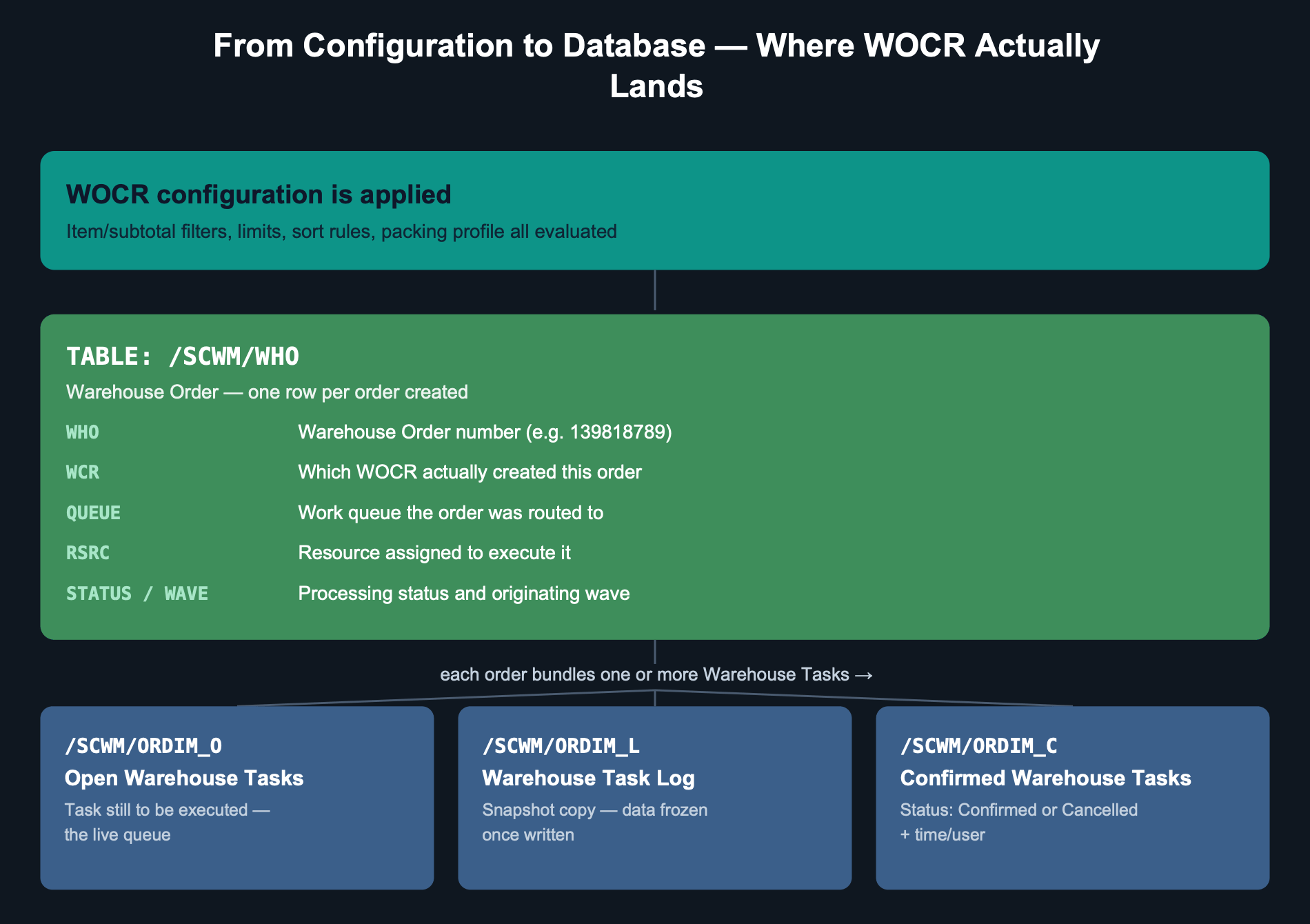
The WCR field in table /SCWM/WHO is the single most useful field for troubleshooting WOCR behavior. If a Warehouse Order looks wrong — too big, too small, badly sorted — this field tells you immediately which rule is responsible, instead of guessing. Pull up the table (or use the Warehouse Management Monitor), find the order, and read the WCR value directly.
While we’re looking at real system data, there’s something more useful to know than any field value: there are two different ways the system can arrive at a rule, and they don’t have equal weight.
The warehouse process type has a WO Rule field. If a rule is entered there, the system uses it — and SAP is explicit that it does so even if there is an appropriate entry in the search sequence of creation rules for activity areas. Only when that field is empty does the system fall back to evaluating the activity area and working through its search sequence.
Each path also has its own safety net, and the two are not the same rule:
DEF— the standard rule, used when the process type names a rule but the task doesn’t fulfil its settings.UNDE— the remainder rule, used when a task fails every rule in the activity area’s search sequence.MFS— reserved for storage types driven by the Material Flow System, and limited to one task per order by default.
These three names are assigned internally by SAP, so don’t reuse them for your own rules. And when a Warehouse Order comes out looking nothing like what you configured, the WCR field usually shows one of them — which is the system telling you your rule was never the one that ran.
A Real Confirmation Worth Knowing
Here’s a detail that surprises people the first time they see it: even an ad-hoc, manually created warehouse task — created outside of any delivery or wave, for example through a direct Handling Unit movement — still triggers Warehouse Order creation automatically. The system doesn’t skip WOCR logic just because the task wasn’t system-generated. The moment a task exists, the same 9-step process from Post 1 runs, and a Warehouse Order gets created and logged with its own WHO number, exactly like any other.
This Week’s Practical Challenge
- Open the Warehouse Management Monitor and pull up any Warehouse Order created today
- Check its WCR value — confirm it matches the WOCR you’d expect for that activity area
- Check the QUEUE and RSRC fields — is it routed and assigned the way you designed it to be?
- If anything looks off, you now know exactly which of the five profiles to open first
Closing Thought
A Warehouse Order isn’t magic, and it isn’t a black box either — it’s the visible output of five configuration decisions, and it leaves a paper trail in the database that tells you exactly which decision produced it. Once you know where to look, «why is this order like this» stops being a mystery and becomes a two-minute lookup.
In the next post of this series, we’ll go deeper into those fallback rules — and into why a search sequence you designed carefully can end up never being consulted at all.
Part of the Warehouse Orders series
Deja un comentario