

Post 2 left you with a promise: order-based replenishment reacts to demand that already exists, and sooner or later that is not enough. You need something that acts on the pick face itself — before an order ever asks.
That is what this post is about. Two methods, both driven by a minimum quantity, both quietly running in most productive EWM systems: Automatic Replenishment and Planned Replenishment.
They are often lumped together. They should not be. The difference between them is when they look, and that difference decides whether your pick face survives a bad Monday.
The Four Methods, and Where These Two Sit
SAP EWM defines four basic replenishment methods. A fifth, Crate Part Replenishment, exists in Customizing and in the replenishment transaction, but it is only used for production supply, so leave it aside for now.
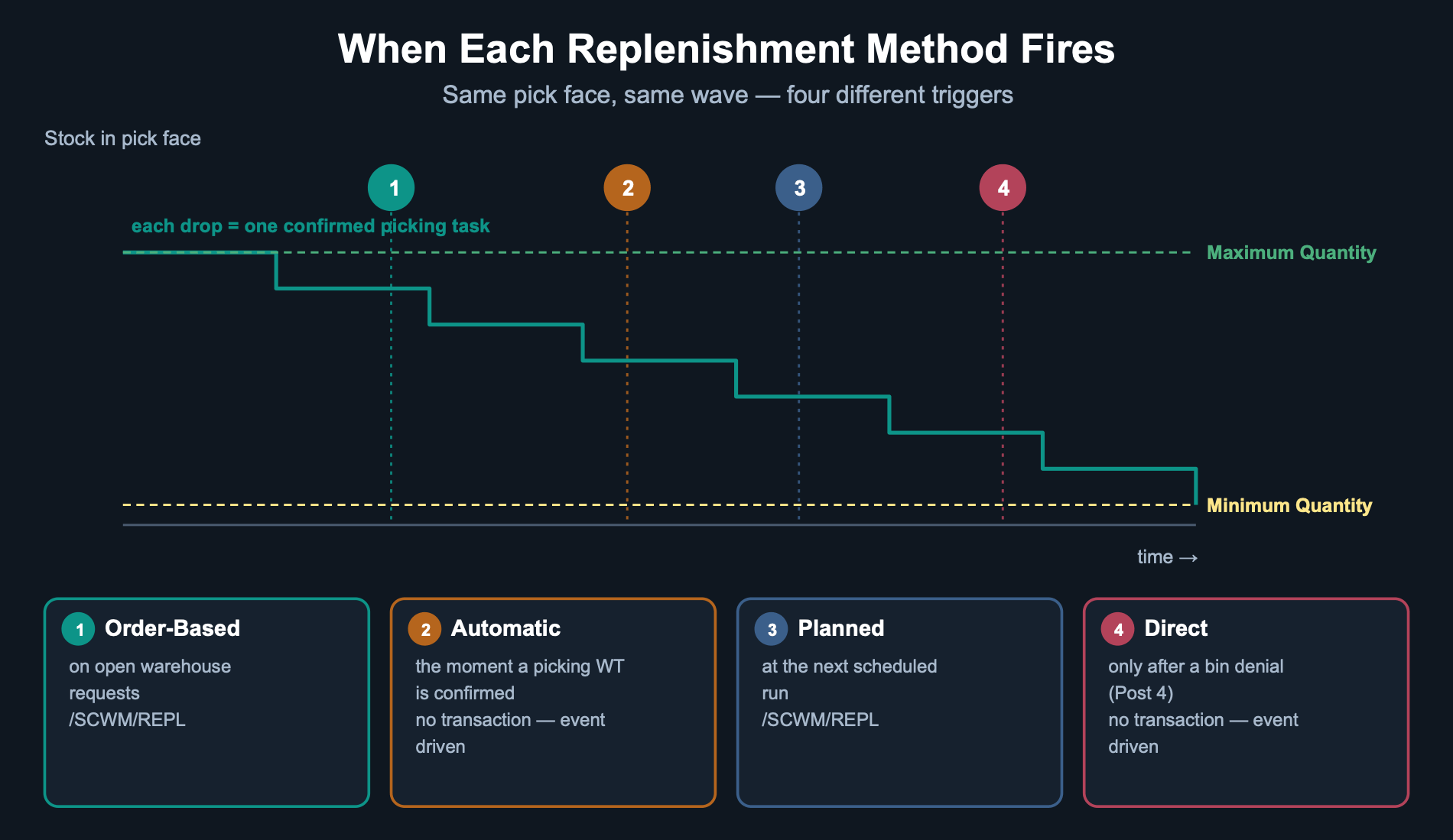
Read that chart carefully, because it is the whole post in one image. Same pick face, same wave, four completely different moments of intervention.
Automatic Replenishment: The One That Reacts Instantly
The system starts automatic replenishment in the background when a warehouse task is confirmed. Replenishment is triggered when the stock is less than the minimum quantity after the confirmation of a picking warehouse task.
Read that once more, because two details in it matter enormously in practice.
First: the trigger is the confirmation, not the picking itself. If your operators pick physically and confirm in a batch an hour later, your ‘automatic’ replenishment is an hour late. The system does not know the bin is empty until someone tells it.
Second: it only looks at the bin it just touched. It is a local reaction to a local event. It will never notice that a completely different bin, untouched all morning, is also below minimum.
Where teams get burned
Automatic replenishment feels like a safety net, so people stop scheduling planned runs. Then a slow-moving product sits below minimum for two days, because nobody picked from it — and therefore nothing was ever confirmed, and therefore nothing ever triggered. The bin is quietly empty until the day an order finally needs it.
Planned Replenishment: The One That Sweeps
Planned replenishment can be started interactively or in the background, from transaction /SCWM/REPL. In the menu you will find it under Extended Warehouse Management → Work Scheduling → Schedule Replenishment. It can also be saved as a program variant and scheduled as a regular background job.
The calculation is the same shape as automatic — replenishment is triggered when the stock is less than the minimum quantity — but the scope is completely different. Planned replenishment sweeps everything in its selection, whether or not anyone touched it.
That is the entire value of it. It catches the bins that automatic replenishment structurally cannot see.
The Rounding Rule Nobody Reads
Here is where these two methods separate themselves from the order-based method you learned in Post 2, and it is worth internalising because it changes physical pallet counts on your floor.
Both minimum-quantity methods round the replenishment quantity down to a multiple of the minimum replenishment quantity, when one is maintained. Order-related rounds up, and the maximum quantity can legitimately be exceeded — SAP is explicit that even though it can be exceeded, you still have to maintain a maximum quantity.
The practical consequence
Run all three on the same pick face and they will disagree about how much stock belongs there. That is not a bug. Automatic and planned are protecting a level; order-related is satisfying a demand. If your bin keeps overflowing, look at which method actually fired last — not at the master data.
What You Have to Maintain First
None of this works on an empty product master. Before replenishment control is used, certain fields in the warehouse product must be updated, and the storage type has to allow the method you expect.
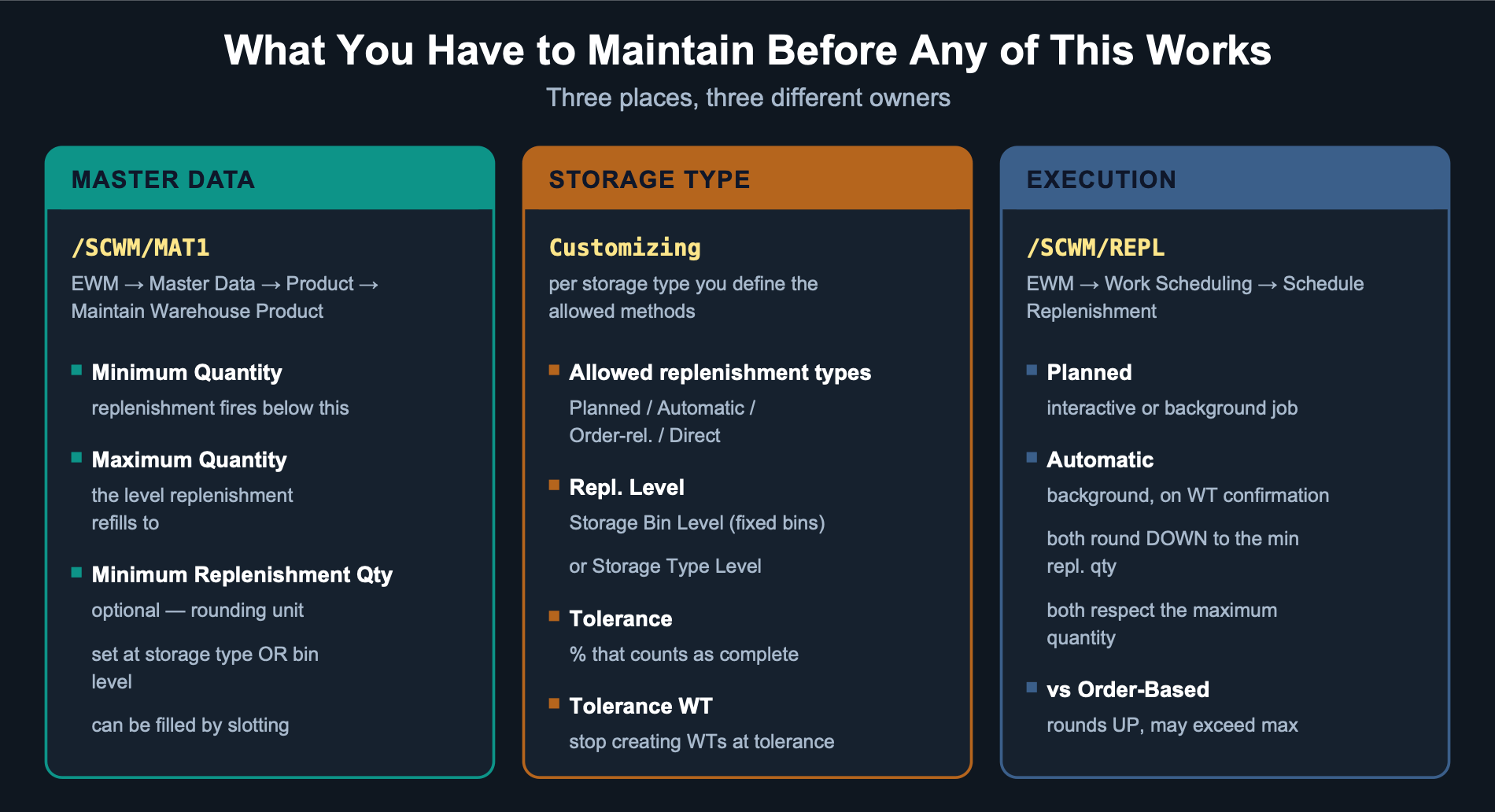
The three master data fields are Minimum Quantity, Maximum Quantity and, optionally, Minimum Replenishment Quantity. You maintain them in the warehouse product via /SCWM/MAT1 — Extended Warehouse Management → Master Data → Product → Maintain Warehouse Product. Warehouse number and party entitled to dispose are mandatory entries.
They can be specified at storage type level or at storage bin level, entered manually or determined by the slotting process. That last option is the one most teams forget: slotting can populate these fields for you instead of someone maintaining hundreds of products by hand.
Two Storage Type Settings That Decide Everything
For each storage type you define which replenishment types are allowed. If the method you are expecting is not permitted there, nothing happens and nothing complains. Check this first when replenishment ‘does not work’.
Then there is the Repl. Level indicator, which determines the level in the storage type from which stock levels are read when replenishment tasks are created. Two options:
Two more fields are worth knowing. Tolerance is a percentage: if the replenished quantity is less than requested but above the tolerance, the replenishment warehouse request is marked complete and no further tasks are created. Tolerance WT ends warehouse task creation once the task quantity reaches the tolerance level.
A design rule worth stealing
Use automatic replenishment for your fast movers, where picks are constant and confirmations are frequent, so the trigger actually fires. Use a scheduled planned run to sweep everything else on a cadence. Neither one alone is a strategy. Together they cover both the bins that move and the bins that do not.
Where You Actually Turn This On
Everything so far describes behaviour. None of it happens on its own — someone has to activate replenishment for the storage type, and someone has to decide where the minimum and maximum quantities actually live. Both are Customizing, not the product master.
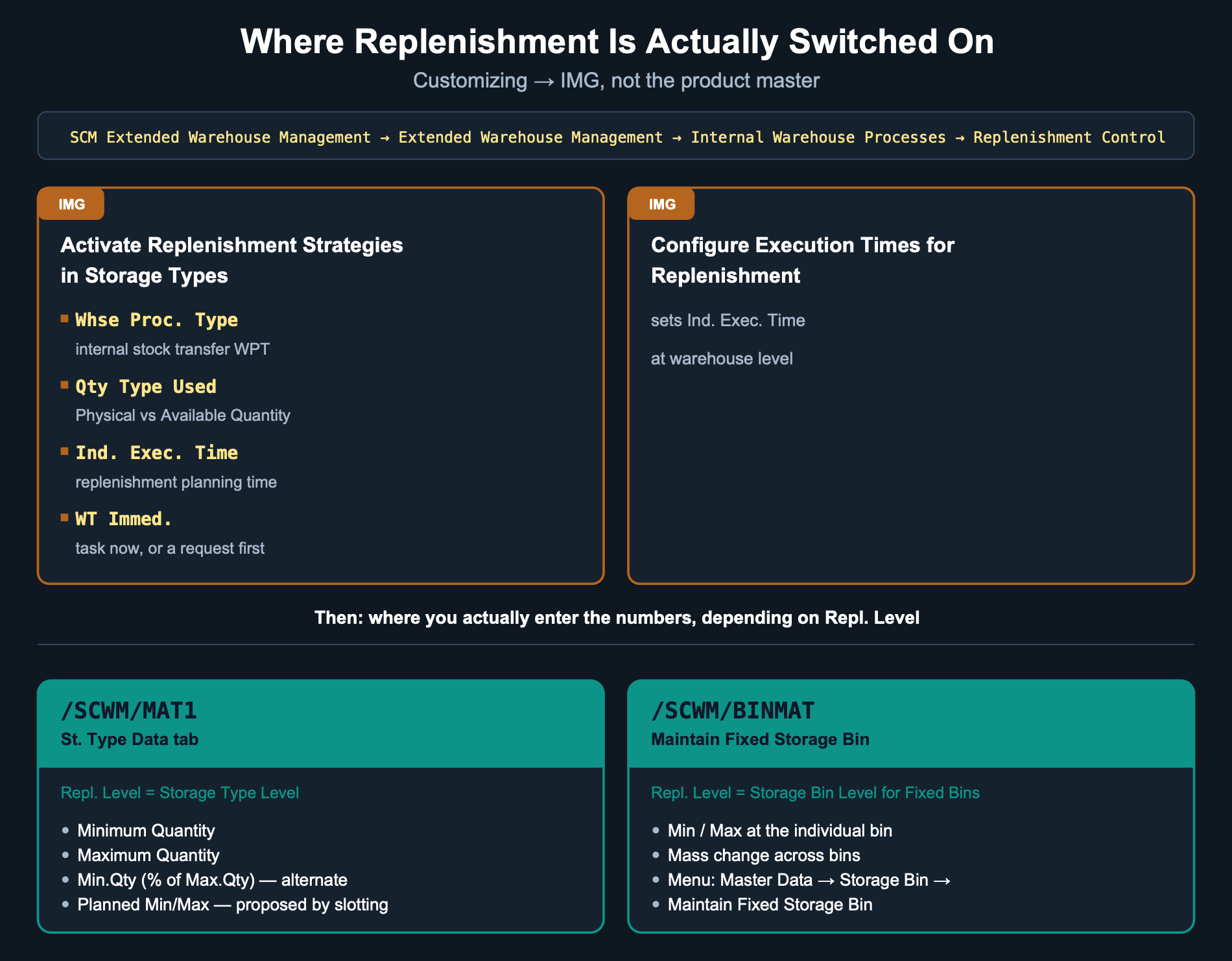
Replenishment is activated per storage type via IMG path SCM Extended Warehouse Management → Extended Warehouse Management → Internal Warehouse Processes → Replenishment Control → Activate Replenishment Strategies in Storage Types. Four fields do the real work there:
- Whse Proc. Type — the warehouse process type used to create the replenishment task. It belongs to the internal stock transfer process category, which is why replenishment never touches an inbound or outbound process type by mistake.
- Qty Type Used — whether the system reads Physical Quantity or Available Quantity when it calculates current stock in the storage type. Available Quantity already nets out open warehouse tasks; Physical Quantity does not.
- Ind. Exec. Time — the replenishment planning time, used to calculate the total planned completion time. It is set separately, at warehouse level, via Replenishment Control → Configure Execution Times for Replenishment.
- WT Immed. — whether the system creates a warehouse task immediately, or a warehouse request first. If it is not set, you get a request that still needs converting to a task before anyone can work it.
If replenishment is not allowed for a storage type here, nothing downstream matters — no rounding rule, no minimum quantity, no scheduled job will ever fire. This is the first thing to check, before touching any master data.
Two Transactions, Not One
Earlier we said the minimum and maximum quantity can be set at storage type level or at bin level, depending on Repl. Level. What was missing is where you actually type the numbers in — and it is not the same transaction for both.
Set Repl. Level to Storage Bin Level and then go looking for the numbers in the product master, and you will not find them — they live in /SCWM/BINMAT instead. It is a small distinction that wastes a surprising amount of debugging time the first time it bites you.
One more field worth knowing about, even if you never touch it directly: Planned Min Qty and Planned Max Qty hold the values a slotting run proposes. Once the slotting run is activated, the planned values move into the actual quantity fields — so a warehouse that runs slotting periodically is effectively recalculating these numbers for you.
How to Tell Which One Is Actually Running
When a pick face behaves unexpectedly, the question is never ‘is replenishment configured’ — it is ‘which method fired, and when’. Work through it in this order:
1. Is the method allowed on that storage type at all?
2. Are minimum, maximum and minimum replenishment quantity maintained, and at which level — storage type or bin?
3. Does Repl. Level match how the bins are actually used?
4. If you expected automatic: was a picking warehouse task actually confirmed, and when?
5. If you expected planned: did the background job run, and did its selection include this product?
Four out of five replenishment incidents I have seen resolve at step 1 or step 4. Almost none of them are calculation problems.
Coming in Post 4
We have covered the proactive methods. Post 4 goes to the opposite extreme: Direct Replenishment, which does not monitor anything. It starts during a bin denial — when an exception code refers to the internal process code ‘Replenishment’ — and it is only possible in fixed storage bin scenarios. It is the method of last resort, and understanding exactly when it fires is what keeps it from becoming your default.
Part of the Replenishment Mastery series
← Previous
More posts coming soon
Deja un comentario