

The consultant had been on that client for three years, and he was not wrong. In that system, you cannot.
What he did not know is that Wave Management never made that decision. Somebody else made it years earlier, when they chose which storage location the production supply area would live in — long before anyone in that room had heard the word wave.
This post is about that decision, how to read which side of it your warehouse is on, and what to configure if you are on the wrong one.
The constraint everything else follows from
A wave groups warehouse request items. Not documents in general — warehouse request items. And only three kinds of warehouse request qualify:
- Outbound delivery orders
- Internal stock transfers
- Posting changes
That list is short and it is closed. Post 1 of this series covered it, and it is the reason production supply is confusing: the production material request also acts as a warehouse request in EWM, which makes people assume it behaves like the other three. It does not appear on that list.
So the real question is never «can EWM wave production supply?». It is: what document does staging create in your warehouse?
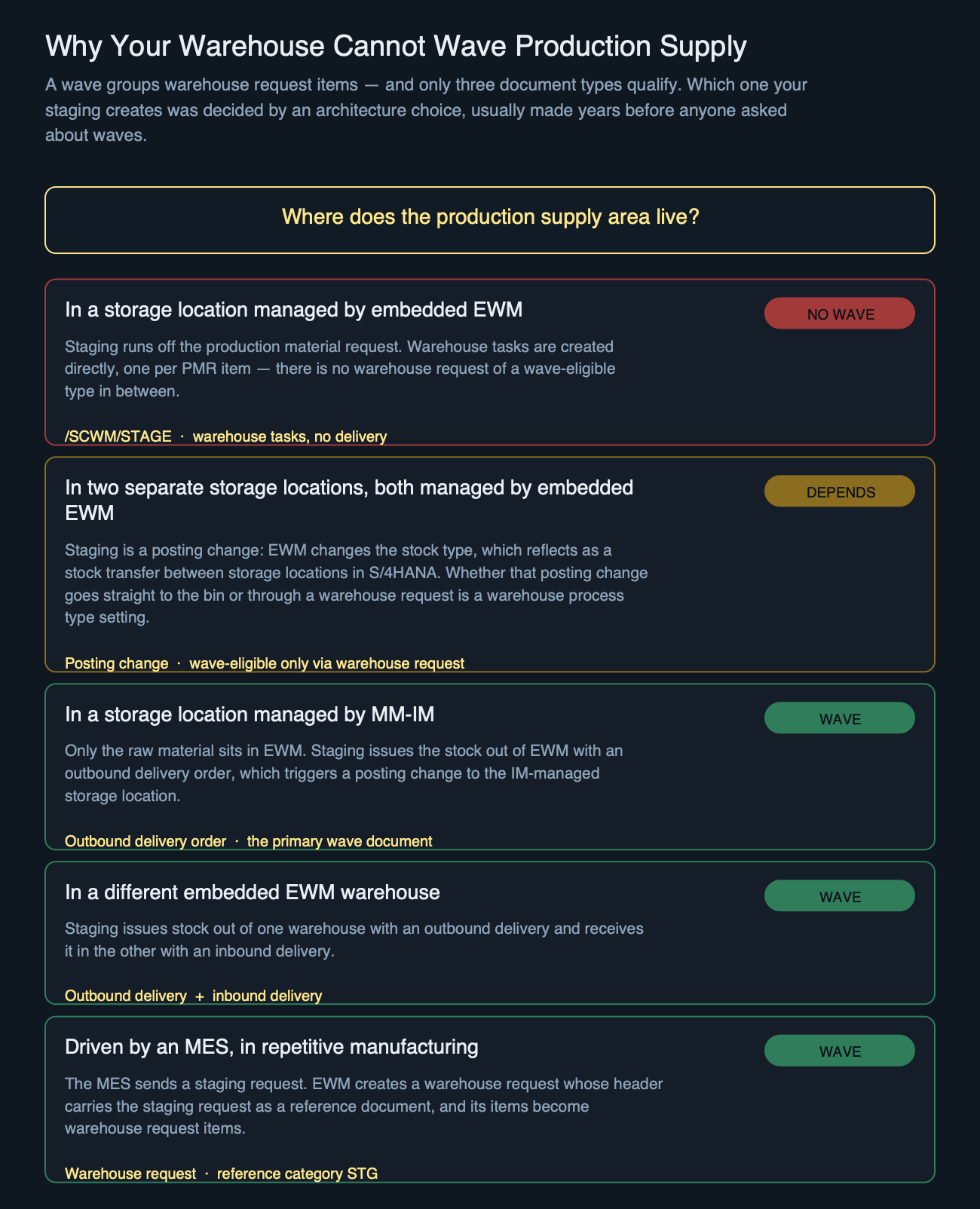
Reading which case you are in
You do not need to ask anyone. Open the production supply area and follow the storage location.
| Where the PSA lives | What staging creates | Wave |
|---|---|---|
| Storage location managed by embedded EWM | Warehouse tasks, straight from the production material request | No |
| Two separate storage locations, both managed by embedded EWM | A posting change — a stock type change inside EWM, which shows up as a storage location transfer in S/4HANA | Yes — if the warehouse process type is set to create a warehouse request for the posting change. No if it posts straight to the bin. |
| Storage location managed by MM-IM | Outbound delivery order, plus a posting change into the IM location | Yes |
| A different embedded EWM warehouse | Outbound delivery in one warehouse, inbound delivery in the other | Yes |
| MES-driven, repetitive manufacturing | Warehouse request carrying the staging request as reference, category STG | Yes |
Four of those five rows are the organisational models for production supply stock; the last one is a different route into the same problem. The first row is the one people meet most often, and it is the source of the folklore. When the PSA is an EWM storage location, staging runs off the production material request and creates warehouse tasks directly — one task per PMR item. There is no wave-eligible warehouse request anywhere in that chain, so there is nothing for a wave to group.
That is not a limitation of Wave Management. It is the absence of the object waves operate on.
The three staging methods, and the field that actually separates them
If you arrived from the last post expecting the staging method — pick parts, release order parts, crate parts — to be what decides whether a wave is possible, it is not. That was already settled by the architecture above, before anyone picked a method. The staging method decides something different, and it is the piece most people get wrong: whether the staged stock stays tied to a specific production material request.
| Method | Task granularity | Reference kept on the stock | Consequence |
|---|---|---|---|
| Pick parts | One warehouse task per PMR item | Yes — stock in the PSA references the PMR item | Only that PMR can consume it. Replenishment is triggered at individual PMR level. Built for batch-specific requirements. |
| Release order parts | One task covering several PMR items, grouped | No — neither the task nor the stock references any PMR | Any PMR whose requirements match can consume it. Four production lines can share one staged pallet. |
| Crate parts | Replenishment-style, on minimum quantity | No — independent of production material requests entirely | Behaves like regular replenishment from warehouse to staging area. |
That middle column is worth sitting with, because it explains a support case you will eventually get: «there is stock in the supply area but the order says it is short.» With pick parts, stock staged for PMR A is invisible to PMR B. It is not a stock problem and not a bug — it is the staging method doing exactly what it was chosen to do.
It also has a tail. When a PMR reaches Technically Completed and unused stock is left in the supply area, that stock cannot simply go back: with the single-order method, the reference to the PMR must be released manually before the leftover can be returned to the warehouse.
Configuring the route that can be waved
If your PSA sits in an MM-IM storage location, staging leaves EWM as an outbound delivery order — and from there everything you already know about waves applies unchanged: condition technique, wave templates, release methods, WOCR on the released tasks.
The setup is on the EWM side and it is short.
1. Map the production storage location to an availability group
SCM Extended Warehouse Management › Extended Warehouse Management › Interfaces › ERP Integration › Goods Movement › Map Storage Location from ERP System to EWM
Assign the availability group to the storage location where the goods will be placed. This is the same mapping that decides stock type on any goods movement — if it is wrong here, the stock arrives in the supply area in a state nobody expects.
2. Define the production supply area, and decide about Trigger GI
Logistics › SCM EWM › Extended Warehouse Management › Master Data › Production Supply Area (PSA) › Define PSA
The Trigger GI indicator posts the goods issue for stock in the supply area immediately, making it available in S/4HANA without waiting. Leave it off and the stock is physically staged but not yet issued — which is correct for some operations and a reconciliation headache in others.
3. Map the PSA between the two systems
… › Interfaces › ERP Integration › Map Production Supply Area (PSA)
Only needed when the PSA was created manually in EWM rather than replicated from S/4HANA. Fill the Supply Area field with its S/4HANA counterpart.
4. Decide how goods issue happens from the supply area
… › Goods Issue Process › Outbound Delivery › Production Supply › Maintain Settings for Auto. Goods Issue for Production Supply
Set GI from PSA to allow background processing for the warehouse number and document type. Two indicators here deserve a decision rather than a default:
- OutbDel Spl All and Item Split All — when the staged and issued quantity is only part of an outbound delivery order, EWM splits the order and posts goods issue for the partial quantity. Without this, partial staging blocks the whole document.
5. Consumption posting
… › Outbound Delivery › Production Supply › Post Goods Issue for Consumption Posting
Set the controls per warehouse number and document type. Auto GI for CP Deliv activates automatic goods issue on the consumption posting delivery.
The other route worth configuring: MES-driven staging
If your plant runs repetitive manufacturing with an MES in the loop, staging does not go through a delivery at all — and it is still wave-eligible, because what arrives in EWM is a warehouse request.
The chain is short and worth knowing before you configure anything: the MES sends a staging request; EWM creates a warehouse request and writes that staging request onto its header as a reference document; the request items become warehouse request items. From there the item is ordinary wave material.
1. Mark the supply area as MES-relevant
Use the Assign Bin to PSA — Warehouse app: select the MES-Relevant checkbox and choose one of the MES-relevant staging methods, such as Single-Order or Cross-Order Staging with the warehouse request. This is the switch that separates MES-driven staging from staging that runs off the production material request — and note that the method names themselves tell you what you are getting: with the warehouse request. Without this, nothing downstream applies.
2. Check the reference document category
The warehouse request header carries the staging request identifier as a reference document of category STG. This is your fastest confirmation that you are on this route rather than the PMR one — if you can see STG on the header, waves are available to you.
3. Choose how the staging tasks get created
Once the warehouse request exists, EWM offers several ways to turn it into staging warehouse tasks: from the warehouse request directly, from the warehouse management monitor, automatically through the PPF, from the Schedule MES-Driven Staging for Production app — or through a wave. That last option is the whole point of this section, and it is the one that never appears in the standard walkthroughs.
Practical note: the app also lets you schedule the capacity check of the supply area bin before creating the tasks. On a supply area with tight space, that check is what stops a wave from releasing work the bin cannot physically hold.
When it should work and does not
Assuming you are on a wave-eligible route and the wave still refuses to form, the checks in order:
| Check | Where | What wrong looks like |
|---|---|---|
| Did staging actually create a delivery? | The document flow of the PMR, or the outbound delivery order list | Warehouse tasks exist but no delivery — you are on the EWM-storage-location route after all |
| Is the item in an open warehouse request? | Warehouse management monitor, warehouse request node | Item already assigned to another wave, or already released |
| Did the condition technique find a template? | Wave template determination | Conditions maintained for outbound but not for this document type |
| Is the capacity profile rejecting it? | Wave template, capacity settings | Wave exists but stays empty, or the item bounces to the next wave |
The first row catches most of them, and it is the cheapest to check. Everything below it assumes a delivery exists.
The shape of this problem
Production supply is where warehouse people meet a decision that was never theirs. The choice of where the supply area lives is usually made during the S/4HANA design, weighed against inventory visibility and plant accounting — not against whether picking can be grouped into waves two years later.
So when someone tells you waves are not possible for production supply, the useful reply is not to argue. It is to ask where the supply area sits. If the answer is an EWM storage location, they are right, and no amount of wave configuration will change it. If it is an IM location, the waves were always available and nobody had looked.
Next in this series: the warehouse management monitor for waves — simulating a release before you commit to it, and the specific nodes that show why a wave is holding items back.
Related Reading
- What Actually Feeds a Wave — the three document types a wave can group, which is the constraint this whole post follows from.
- Automatic and Planned Replenishment in SAP EWM — control cycles and minimum quantities, the mechanism that keeps a production supply area topped up between staging runs.
- Wave Management for Outbound Deliveries: A Full Walkthrough — the same release chain, on the document type everybody already uses.
- Anatomy of a Warehouse Order Creation Rule — what happens to the tasks once a wave releases them.
Not sure which case your warehouse is in?
Ask in plain language and get the transaction, the Customizing path, and the article it came from — answered the way a warehouse architect would answer it.
Ask the EWM assistant →Free account · 20 questions a day · no credit card
Part of the Wave Management series
Next →
The Warehouse Management Monitor for Waves (coming soon)
Deja un comentario