

Older overviews of SAP WM in S/4HANA all say the same thing: a deadline is coming. It’s not coming anymore — it already happened. WM’s compatibility pack in SAP S/4HANA expired on December 31, 2025. This is the version of that post written after the deadline, with the facts as they actually stand today.
The Real Deadline
SAP WM launched in 1993 as a submodule of Materials Management in SAP R/3 — decades before EWM existed. On SAP S/4HANA, it survived only through a compatibility pack: limited usage rights to keep running a classic solution while customers migrated to its S/4HANA replacement. Compatibility packs require that you’ve actually acquired the usage rights under your license agreement — they were never an automatic, permanent entitlement.
That compatibility pack — covering WM specifically — expired December 31, 2025. Support for decentralized WM ended on the same date. The details live in SAP Note 2269324, which is the actual source for the deadline, not a rumor or a blog estimate.
If you had an existing integration running on decentralized WM before that date, SAP has said you can continue operating it. But that’s a grandfather clause for existing landscapes, not a green light for new ones — SAP’s own guidance is that embedded EWM has been, and remains, the strategic focus for warehouse management in S/4HANA.
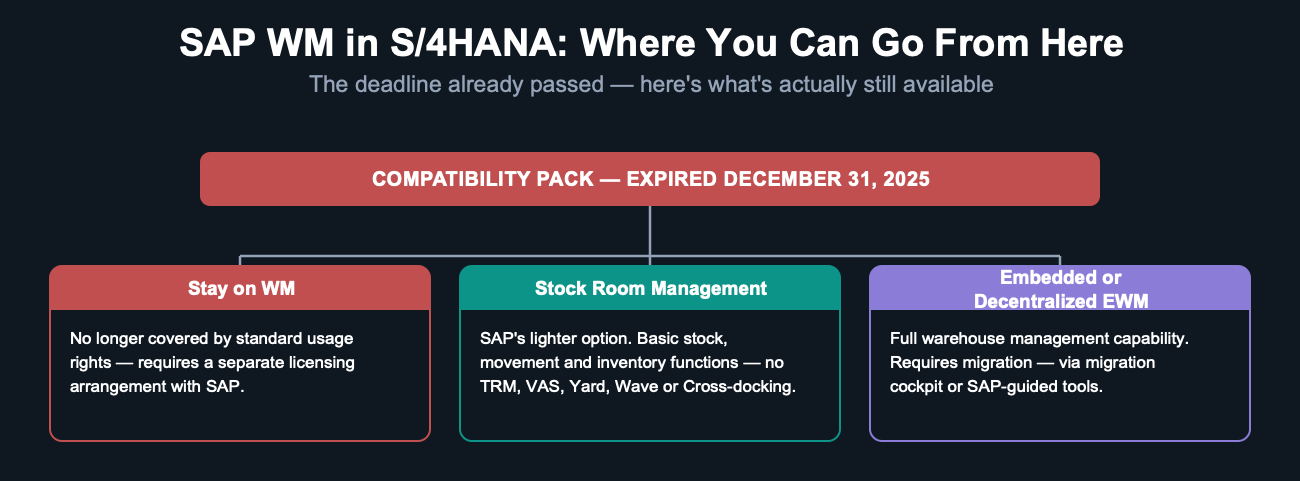
What You Lose With Stock Room Management
Stock Room Management is SAP’s soft landing for WM customers who need to be on S/4HANA without a disruptive rip-and-replace project. It’s real, and it works — but it’s explicitly the lighter option, aimed at small, low-complexity warehouse operations. These WM functions are not available under Stock Room Management:
- Task and Resource Management (WM-TRM)
- Warehouse control unit interface (WM-LSR)
- Value-Added Services (WM-VAS)
- Yard Management (WM-YM)
- Cross-docking (WM-CD)
- Wave Management (WM-TFM-CP)
- Decentralized WM (WM-DWM)
If your operation genuinely depends on any of these, Stock Room Management isn’t a real option for you — you’re looking at embedded or decentralized EWM instead.
What Stock Room Management Actually Gives You
What older coverage of this topic usually skips is what Stock Room Management actually does include. It’s a real, coherent set of warehousing functions, grouped into four areas:
- Inventory Management (IM) process — manage stock quantity across storage bin, storage unit, batch, stock status, and stock attributes.
- Outbound stock movement — pick from source bins and move stock out for external/internal customers, production supply, vendor returns, or scrapping, using strategies like LIFO and FIFO.
- Inbound stock movement — put away stock from interim staging bins into final storage bins, using configurable putaway strategies.
- Internal stock movement — move stock between physical areas for replenishment or end-of-day reorganization, including ad hoc transfer orders.
- Physical inventory — plan, count, and post stock counts against book inventory, with three counting methods: annual counting, continuous counting, and cycle counting.
- Stock data reporting — open/confirmed transfer orders, bin-level stock and attribute information, and open/closed transfer requirements.
One practical upside: Stock Room Management doesn’t ask you to learn a new interface. It reuses the same SAP ERP WM transactions you already know — for creating transfer requirements, transport orders, and the rest of your transactional data — plus the same master data (Warehouse Management View 1 and 2, bins) and the same Customizing approach for organizational structure, putaway, and stock removal strategies. The catch: because of the compatibility scope matrix, some transactions that existed in classic WM simply aren’t part of Stock Room Management, even though everything else feels familiar.
For a genuinely small warehouse with simple flows, that’s often enough. The mistake is assuming it’s enough without checking the «what you lose» list above first.
The Real Migration Paths
SAP documents specific migration scenarios, each with its own approach and prerequisites — not every path you’d assume exists actually does:
| From → To | Approach |
|---|---|
| WM → WM in S/4HANA | Compatibility pack (see SAP Note 2269324) — now expired |
| WM → Embedded EWM in S/4HANA | SAP migration tools for master data and warehouse layout; see the migration guide on SAP Support Portal |
| Standalone SAP EWM + SAP ERP → Decentralized EWM in S/4HANA | Requires standalone SAP EWM 7.0 SP13 or higher; see SAP Notes 2241931 and 2376061 |
| Decentralized SAP EWM + SAP ERP → Embedded EWM in S/4HANA | Not currently possible as a direct upgrade |
| SAP EWM add-on in SAP ERP → Embedded EWM in S/4HANA | Not currently possible — the add-on isn’t released for on-premise S/4HANA |
The migration cockpit app handles a defined set of objects for the SAP EWM-to-decentralized-EWM scenario specifically: Material Flow System, Physical Inventory Settings, Production Supply Area, Resource and User Maintenance, Resource Execution Settings, Resource Group and Queue Settings, Shipping and Receiving Settings, Warehouse Application Log Settings, Work Center Dependent Settings, and Work Center Determinations. If your migration path isn’t in that scenario, don’t assume the cockpit covers it automatically.
How You Actually Choose the Level
This isn’t a decision you make once during project scoping and forget — it’s a real Customizing setting. You select the warehouse management level via:
SPRO → SCM Extended Warehouse Management → Extended Warehouse Management → Master Data → Acknowledge Use of Advanced Functions
You can change the level later, provided your license agreement covers it — but «provided your license agreement covers it» is exactly the clause worth checking before you build a project plan around a level you haven’t actually confirmed you’re licensed for.
Related Reading
- Embedded vs Decentralized EWM: How to Actually Choose — if Stock Room Management isn’t enough, this is the real decision between the two full options
- Inside an SAP EWM Warehouse — where this decision fits in the end-to-end picture
Deja un comentario