

A pallet comes back from a customer. Before it can go anywhere near reserve stock again, someone has to move it from unrestricted-use to quality inspection. Nothing physically moves yet — the bin stays the same. Only the status of the stock changes.
Where does that click happen? In SAP S/4HANA, or in EWM? The honest answer is: it depends on how EWM is deployed — and the difference is not a matter of taste, it is a real architectural fact you can verify in a table.
What a Posting Change Actually Is
A posting change is how you change a product’s characteristics — its stock type, its owner, sometimes its batch — without necessarily moving it to a different bin. Unrestricted stock becomes quality-inspection stock. Company-owned stock becomes vendor consignment stock. The product does not leave the warehouse; only what the system knows about it changes.
This can be planned — a scheduled requalification, a subcontracting agreement ending — or unplanned, triggered by a quality inspection result that fails a batch on the spot.
The Table That Actually Answers the Question
SAP EWM formalizes every delivery-processing interaction as a document category with its own transaction, and — this is the part that matters here — its own availability per deployment. Two of those categories are what this whole question comes down to:

Read that literally and the answer falls out on its own. In embedded EWM, the Posting Change Request (POR) simply does not exist as a document category — because ERP and EWM are the same system sharing the same database. There is nothing to request from yourself. Every posting change goes through SPC, and it goes through synchronously.
In decentralized EWM, both exist. ERP can send a formal request (POR) asking EWM to execute the change — that’s the classic case of a two-step stock transfer started in ERP with MIGO or MB1B using movement type 313 or 315. Or EWM can execute the change locally, on the warehouse floor, and report back to ERP via SPC. Both paths are equally valid — which is exactly why someone has to decide which one is the default for a given warehouse instead of leaving it to whoever gets there first.
The one sentence worth remembering
If you’re on embedded EWM, stop debating who owns the posting change — there’s no separate request to own. If you’re on decentralized EWM, the debate is real, and it should be settled in Customizing, not by habit.
Why Embedded EWM Feels Instant
Embedded EWM doesn’t just skip the request document — it posts synchronously. As soon as a posting change is confirmed in EWM, the update to Inventory Management (IM) in S/4HANA happens in the same transaction, not in a queue processed later.
This matters more than it sounds. If IM rejects the posting — say, the target stock type doesn’t exist for that storage location — the error surfaces immediately in the EWM screen, before anything is confirmed. Compare that to a failed queue you only discover hours later, after a report has already assumed the stock moved.
Two Settings That Decide the Details
Two fields, both at the warehouse process type level, decide the mechanics once you know who’s triggering the change:
In EWM, this all runs through /SCWM/POST, the posting change screen — you can search by product, HU, storage bin, resource, or transportation unit, then enter the new stock type, owner, batch, or usage directly.
Setting It Up: The Real Customizing Path
None of the behaviour above is automatic. It’s five IMG nodes, and one of them only matters if you’re on embedded EWM.
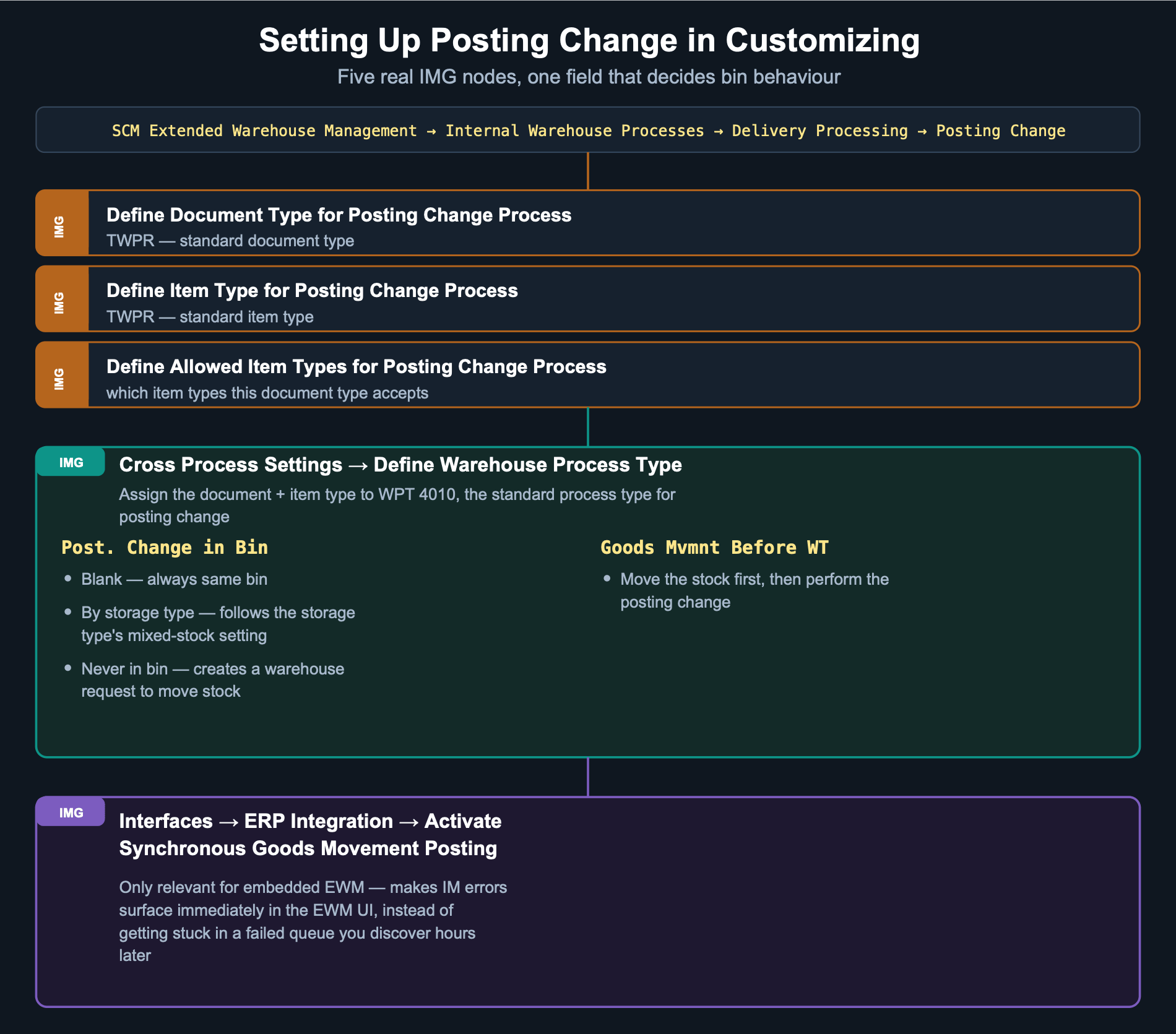
The standard warehouse process type for posting change is 4010, and the standard document/item type is TWPR — both usable as-is or copied into your own variant.
So Where Should You Actually Trigger It?
Skip the philosophical debate. Work through this instead:
1. Are you on embedded or decentralized EWM? This alone answers 80% of the question — on embedded, stop looking for a POR that doesn’t exist.
2. Is the change planned or reactive? A scheduled requalification fits an ERP-triggered request; a failed quality inspection on the floor fits an EWM-triggered change on the spot.
3. Does the storage type’s Repl. Level or mixed-stock setting already dictate bin behaviour? Check Post. Change in Bin before assuming a warehouse task will or won’t be created.
4. On embedded EWM, is synchronous goods movement posting actually active? If errors aren’t surfacing immediately, that IMG activation is the first thing to check.
Related Reading
- Warehouse Process Type: The Invisible Engine — WPT 4010, the process type behind every posting change
- Inside an SAP EWM Warehouse — where posting change fits in the end-to-end flow
Part of the EWM Common Topics series
Deja un comentario